
Solution
Room Booking System
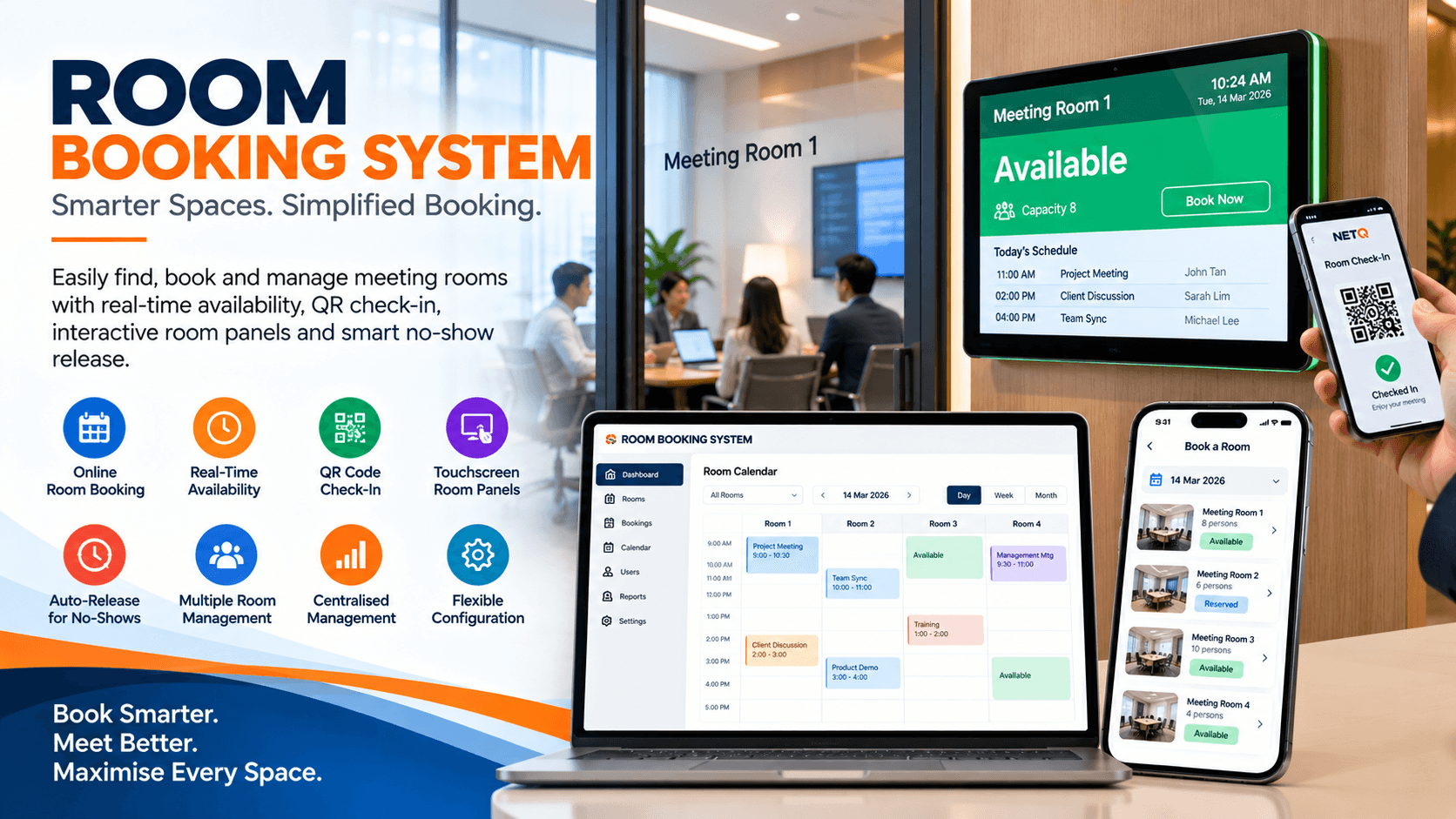
Arrowlogic Room Booking System is a meeting room booking system for Singapore workplaces that shows real-time availability, prevents double-bookings, and turns your meeting rooms into a well-used, measurable resource — from mobile and desktop to room display panels at every door.
The challenge
Meeting rooms are hard to find and easy to waste
In a busy workplace, people walk the floors looking for a free room, double-book the same space, and hold "ghost" reservations for meetings that never happen. Facilities teams have no reliable picture of how rooms are actually used.
- Staff waste time hunting for an available meeting room
- Double-bookings and booking conflicts disrupt meetings
- No-show reservations lock up rooms that then sit empty
- Facilities teams lack data to right-size the room portfolio
The solution
One workplace booking system for every room
Arrowlogic Room Booking System lets employees find and reserve the right space from their calendar, phone, or a display panel at the door. Real-time availability prevents conflicts, unused rooms are released automatically, and management analytics reveal exactly how your meeting rooms are used.
Benefits
Outcomes that matter to your workplace
Higher room utilisation
Turn under-booked and over-subscribed rooms into a right-sized, better-used portfolio backed by real data.
No more booking conflicts
Real-time availability across every channel prevents double-bookings and awkward room clashes.
Fewer wasted rooms
Automatic release of unused rooms returns no-show reservations to the pool for everyone else.
Effortless for employees
Find and book the right room in seconds from Outlook, mobile, web, or a panel at the door.
Features
A complete meeting room management system
Real-time availability
See which rooms are free now and later across every floor and site at a glance.
Room display panels
Door-mounted panels show live status and let staff book, extend, or end a meeting on the spot.
Automatic release
Unconfirmed or no-show reservations are released automatically back to the available pool.
Calendar integration
Two-way sync with Microsoft 365, Google Workspace, and Exchange calendars.
Search & filtering
Filter by capacity, location, floor, equipment, and amenities to find the right room fast.
Analytics & reporting
Understand utilisation, no-shows, and demand patterns to plan your workspace.
Room display panels
A clear status at every door
Door-mounted room display panels show whether a space is free or in use at a glance, so people stop wandering the floor to find a room. Colour-coded status, the current and next meeting, and one-tap actions make booking effortless.
- Colour-coded availability visible down the corridor
- Book, extend, or end a meeting directly on the panel
- Shows the current organiser and the next booking
- Reserve an available room on the spot for ad-hoc meetings
Available
Meeting Room 4A · Level 12
Reminder
The organiser is prompted to confirm or check in as the meeting begins.
Grace window
A configurable window (for example 10 minutes) allows for a late start.
Auto-release
If unconfirmed, the room returns to the pool and is free to book again.
Automatic release
Reclaim rooms lost to no-shows
Ghost bookings are one of the biggest causes of meeting-room scarcity. Arrowlogic asks organisers to confirm their meeting, and automatically releases rooms that are never checked in — putting empty spaces back into circulation without any admin effort.
Calendar integration
Works with the calendars you already use
Two-way synchronisation keeps the room booking system and your workplace calendars perfectly in step. Book from Outlook or Google Calendar and it appears on the panel; book from a panel and it appears in the calendar — so availability is always accurate and conflicts never happen.
- Microsoft 365 & Outlook
- Google Workspace Calendar
- Microsoft Exchange
- Exchange Online
Search & filtering
Find the right room, not just any room
Employees can search across every building and floor and filter by exactly what a meeting needs — capacity, location, equipment, and amenities — then book the best match in a couple of taps.
- Capacity
- Building & floor
- Video conferencing
- Interactive whiteboard
- Wheelchair accessible
- Natural light
- Catering allowed
- Available now
Management analytics
Turn room usage into workplace decisions
Facilities and workplace teams get the data to right-size the room portfolio, justify space changes, and stop the scramble for meeting rooms — all from clear, exportable dashboards.
Utilisation
Room and floor utilisation rates over any period
No-shows
No-show and auto-release rates by room and team
Peak demand
Busiest days, times, and most-contended rooms
Right-sizing
Under- and over-used rooms to plan your portfolio
Use cases
Where it's used
- Corporate headquarters and multi-floor offices
- Government agencies and shared meeting facilities
- University and campus room scheduling
- Hospital and clinic consultation and meeting rooms
- Coworking and flexible workspace management
Integrations
Better together with the Arrowlogic ecosystem
The Room Booking System connects to the rest of your workplace stack for a single, coherent experience.
- Microsoft 365 & Outlook calendars
- Google Workspace Calendar
- Microsoft Exchange
- Visitor management system
- Digital signage & room display hardware
- Occupancy & IoT sensors
- Single sign-on (SSO) & directory
Visitor Management System
Secure, compliant, and welcoming visitor check-in for every site.
Appointment Booking System
Let customers book the right service, time, and location online.
Digital Signage Solutions
Publish real-time information and content to any screen, anywhere.
Audio Visual Integration
Meeting rooms, auditoriums, and control rooms that just work.
Why Arrowlogic
A serious partner for your workplace technology
Organisations choose Arrowlogic because we combine enterprise-grade engineering with an integrated product ecosystem and genuine end-to-end accountability.
Improve Operational Efficiency
Streamline everyday processes and reduce unnecessary manual work.
Enhance User Experience
Create smoother experiences for customers, visitors and employees.
Support Digital Transformation
Connect physical environments with practical digital technology.
Scalable Across Industries
Solutions that can be adapted to different operational environments and requirements.
FAQ
Room Booking System FAQ
Does the room booking system prevent double-bookings?
Yes. Availability is calculated in real time and kept in two-way sync with your calendar platform, so a room booked from Outlook, the web, mobile, or a door panel is immediately shown as reserved everywhere — eliminating conflicts and double-bookings.
Which calendar systems does it integrate with?
The system integrates with Microsoft 365 and Outlook, Google Workspace, and Microsoft Exchange. Bookings sync both ways, so reservations made in the room booking system appear in the calendar and vice versa.
How does automatic release of unused rooms work?
Organisers are asked to confirm or check in to a meeting, typically from the room display panel. If a booking is not confirmed within a configurable window, the room is automatically released back to the pool so the space is not wasted on no-shows.
Can we see how our meeting rooms are being used?
Yes. Management analytics show utilisation rates, no-show rates, peak demand periods, and the most and least used rooms — giving facilities and workplace teams the data to right-size and plan the room portfolio.
Do the room display panels work with our existing hardware?
The room booking system supports common room display panels and tablets and integrates with Arrowlogic digital signage, so in many cases existing screens can be reused. We assess your hardware and recommend the most cost-effective mix.
Related products, rentals & resources
More from Arrowlogic connected to this solution.
See the Room Booking System in action
Book a demo and our team will show you how Arrowlogic makes meeting rooms easy to find, impossible to double-book, and fully measurable across your workplace.
End-to-end consulting, integration, and support